This article is an excerpt from chapter 7 of the book: Practical Productivity: Simple Habits for Busy Humans
As most of us unfortunately know, hospital emergency rooms aren’t the funnest places to be…. OK. That was a major understatement. Sorry. That said, let’s take a quick look at what’s happening behind the scenes while you’re sitting patiently in the waiting room.
In a hospital emergency room, triage is all about making quick decisions when patients arrive. Nurses don’t just line people up in order; they assess each person and decide what happens next. Someone having a heart attack gets rushed straight back. Someone with a minor cut might wait an hour. The person with flu symptoms sits somewhere in the middle. And yes, there’s always that guy who somehow glued his hand to his forehead. Not life-threatening, but probably needs attention eventually.
No matter what, every single patient eventually gets sorted into a clear next step. No one just sits there indefinitely without a plan. Someone gets immediate care, someone else gets sent to wait in a specific area, and glue-hand guy… well, we’ll leave him in the waiting room for a while because it’s just fun to watch. But eventually, everyone gets treated and discharged. Nobody lives in the ER (even though sometimes it feels like it!)
Your inbox should work exactly the same way. Not just your email inbox either. Whether it’s texts, Slack, Teams or LinkedIn messages, every inbox you manage is an emergency room that needs constant triage. Messages arrive like patients, you assess them quickly, take the appropriate action, and discharge them. Leaving messages unaddressed is like letting patients pile up in the waiting room indefinitely. Eventually, the whole system collapses.
The problem is that most of us treat our inbox like a hospital waiting room where patients check in but never leave. Messages arrive and just… sit there. We read them, think “I’ll deal with this later,” and leave them in the waiting room. Days turn into weeks, weeks turn into months, and suddenly we’re managing a waiting room with thousands of patients who’ve been sitting there so long they’ve started decorating the place and ordering pizza.
Time to clear out the waiting room!
At its core, the digital triage process is simple. It works like this:
Step 1: Patient Arrives (Message comes in.)
Step 2: Triage & Treatment (Categorize & take action.)
Step 3: Patient Discharge (Remove it from the inbox.)
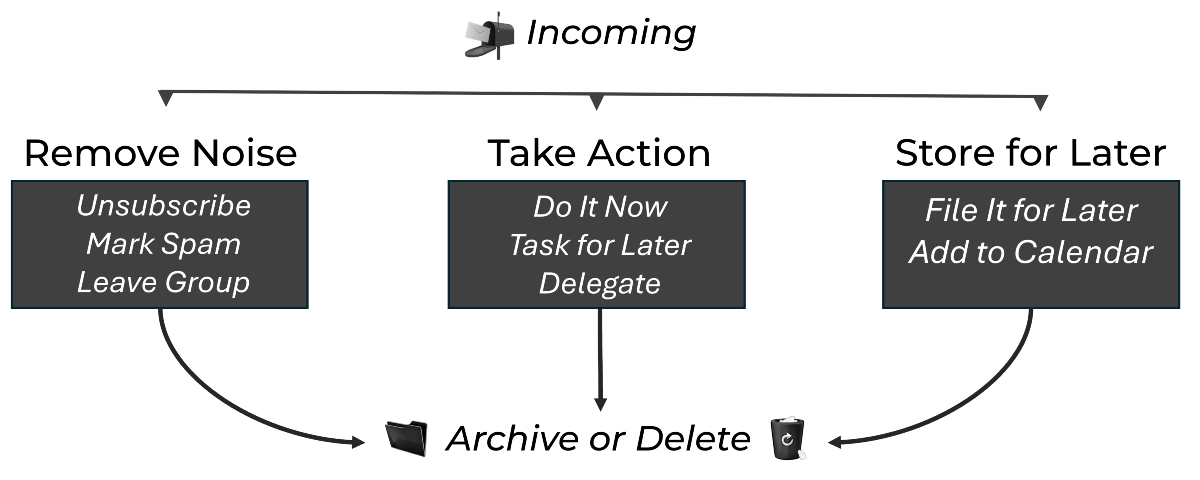
Just like we wouldn’t put bills and other mail back in our physical mailbox (as much as we’d like to), we shouldn’t leave messages lingering after we’ve triaged them. The magic happens in that middle triage step, where every message gets sorted into one of three categories: Remove Noise, Take Action, or Store for Later.
Take a look at the diagram below. See how everything flows from incoming messages at the top, through one of three triage categories in the middle, and then exits at the bottom? That’s your entire digital triage system in one image. No message gets to set up camp in the middle. Every single one follows this path: arrive, triage, discharge.
All right, let’s break down Step 2 (Process) a little further to see how each category works in practice.
Category 1: Remove the Noise
These are the messages that shouldn’t be in your inbox in the first place. The digital equivalent of junk mail that somehow keeps finding its way to your door. You have three powerful tools to eliminate this noise permanently. (Check out the left box in the diagram.)
A. Unsubscribe from Irrelevant Lists
It’s really easy to sign up for newsletters, promotions, or services without realizing it. And half the time we never even signed up for them in the first place! They just started magically appearing in our inbox one day, maybe because we bought something online, entered a contest, or filled out a form somewhere. Or maybe just because some ‘bot’ out there caught wind of your amazing personality and decided it liked you. Even when we do intentionally subscribe to newsletters or promotions, we often outgrow them over time. Yet, they keep coming and coming, cluttering up our inbox.
One of the simplest ways to cut down on digital noise is to simply unsubscribe from email lists you no longer need. Yes, I mean literally scrolling to the bottom of those emails and clicking the tiny ‘unsubscribe’ link that’s usually hiding down there.
I do this religiously. If I see something showing up in an email inbox I didn’t ask for, I immediately unsubscribe. Five seconds. Done. No more interruptions or clutter. The cumulative consistency for me means my inbox always and only shows me communications that matter to me.
Commit to doing the same every time a non-essential email comes in. That way, you’re not just cleaning up once, you’re keeping your inbox organized for the long run.
B. Mark as Spam
Before you start unsubscribing though, you need to know how to do this safely. If the unwanted email is from an obviously legitimate source (like Target, Amazon, or a podcaster you used to follow), go ahead and use their unsubscribe link. But if you’re not 100% sure the source is legit (like the company that wants you to buy their cool new magnetic bracelets that cure everything from baldness to your fear of clowns) don’t even try to unsubscribe. Just mark it as spam instead.
Here’s why: some spam emails include fake unsubscribe links designed to confirm that your email address is active, which ultimately just invites more junk into your world. When in doubt, mark it as spam so your email provider can filter future messages for you.
C. Leave Unnecessary Groups
Now let’s talk about those distribution groups or business chat channels. You know what I’m talking about. Your well-meaning coworker adds you to a Slack channel for “Fun Office Memes” or you get pulled into a Teams group for a project you barely touched six months ago. Maybe you’re still in that email distribution list for the committee you left last year, or you’re part of seventeen WhatsApp groups where you haven’t said a word in months. Each one generates notifications, each one adds to the noise, and most of them have nothing to do with your actual work or priorities.
All it takes is a few quick clicks or, in the case of an email distribution group, a simple request to be removed, and voila (why doesn’t that look like it sounds?) you just added minutes and potentially hours to your week! Amazing!
Of course, sometimes you don’t have a choice; you’re in the group whether you like it or not. Yay for you. When you’re stuck in mandatory groups or channels, you need different tactics. For email distribution lists you can’t escape, set up filters or rules to automatically route those messages into a separate folder or label. Let them accumulate there for review during your scheduled email time instead of cluttering your main inbox.
For chat channels, most platforms let you mute conversations or customize notifications. You might set a channel to only notify you for direct mentions, or turn off notifications entirely and check it once a day. Some teams make it standard practice to use @mentions for anything important, which means you can dial down general notifications and only get pinged when someone specifically needs your input. The goal isn’t to ignore these groups completely, but to control when and how they grab your attention.
After removing noise through any or all of these methods, the message should then exit your inbox immediately. Delete it. It’s gone. No further action needed.
Category 2: Take Action
This category is for the legitimate messages that need you to actually do something. They’re not noise, they’re real work. But they still don’t get to live in your inbox. You have three options for handling action items. (The center box in the diagram shows your choices.)
A. Do It (Less than 2 minutes)
If you can handle it in under two minutes, just do it now. Reply to that quick question. Send that file. Approve that request.
Why two minutes? Because it takes more mental energy to defer it, remember it, and come back to it later than to just knock it out now. This comes straight from David Allen’s Getting Things Done methodology, and it’s pure gold.
“Do it. Do it now.” — Arnold Schwarzenegger
Think about it. By the time you’ve read the message, processed what it’s asking, and decided to deal with it later, you’ve already spent a minute. You might as well finish the job. Plus, there’s something deeply satisfying about handling things immediately. No mental residue, no nagging feeling that you’re forgetting something.
B. Task It
If it’s going to take more than two minutes, it needs to go on your task list. Not the “I’ll remember to do this later” list. And not “I’ll leave it in my inbox as a reminder.” It goes on your actual task list with a due date and everything.
This is important. Using your inbox as a task list is like using your kitchen counter as a filing cabinet. Sure, you can see everything, but good luck finding what you need when you need it. Plus, new messages keep getting peanut butter stains… I mean buried by the old ones, and suddenly that important request from last week is fourteen miles down in your inbox.
C. Delegate It
My favorite thing to do with emails? Give them away like Christmas gifts! If someone else should handle this, forward it with clear instructions. “Hey Sarah, can you handle this by Friday?” Done.
Of course, if you’re the one ultimately responsible for making sure it gets done, it’s also wise to add a follow-up task to your to-do list. Don’t leave the communication sitting there as your reminder. The email gets archived, and your task list gets a new item: “Follow up with Sarah on budget update – Friday.”
Delegation isn’t dumping (usually)—it’s strategic distribution of work to the right people. Before forwarding, ask yourself: Is this person the right fit for this task? Do they have the context they need? Have I been clear about expectations and deadlines?
After taking any of these actions, the original message must leave your inbox. Archive it if you might need to reference it later, delete it if you won’t.
Category 3: Store for Later
Finally, some messages contain information you’ll probably need later but don’t require immediate action. These need proper storage, not inbox squatting rights. (The right box represents storage options.)
A. File It
Some messages contain reference information you’ll need later. Contract details, project specifications, important decisions. These need to be filed somewhere useful, not left floating in your inbox hoping you’ll remember they exist.
Filing means moving key information from the inbox into a proper storage space, like a file folder, cloud drive, or other online tool. If you’re the “Print this so I can put it in a physical folder” kind of person, that works too. This ensures the information is organized, easy to access, and available when you need it. Plus, it gives you the flexibility to add notes, context, or updates, making the information even more useful down the line.
A little side note. With email, I know it can be tempting to store messages long-term in labels or folders within your email client. While this can work for some situations, I suggest considering other options whenever possible. Email storage often (1) takes up unnecessary space, (2) makes it harder for others to access the information when needed, and (3) limits your ability to add or update details. If you have the option, try moving the content to a dedicated storage tool where it’s easier to manage, share, and keep track of.
For example, if you get an email with warranty information for equipment you bought, save that PDF to your files and archive the email. If someone sends project requirements, add them to your project management system. The point is to put information where it belongs, not where it just happened to land.
B. Schedule It
This one might seem obvious, but it still needs to be said. Got a meeting invite? Here’s a cool idea. Add it to your calendar immediately (if it’s not added automatically for you.) But don’t just add the meeting itself. If you think you’ll need prep time, schedule that at the same time. If someone’s asking you to present a proposal next Friday, block out “Prepare presentation” on Wednesday.
Event invitations, deadline reminders, anything with a time component should go straight to your calendar. Your calendar is the source of truth for all time-based commitments, not your inbox.
Once it’s on your calendar, the original message leaves your inbox. Archive it if it contains important details you might need, delete it if everything’s already captured in the calendar entry.
Don’t Forget To Discharge (Archive or Delete)
This is where most people get stuck. It’s the non-negotiable. So far, what we’ve discussed seems practical, maybe even obvious. You triage the message, take the action, and then… umm… leave it sitting in your inbox? That’s like treating a patient and then leaving them in the ER bed forever. Trust me. Just like you want to get out of the emergency room as quickly as possible, so do your messages!
After you’ve ‘triaged’ and ‘treated’ any message through one of the three categories, it MUST be discharged from your inbox. No exceptions. No “They might have follow-up questions.” No “What if there are complications?” No “I’m not sure where to send them.”
Your simple discharge decision:
- Will I need the medical records later? Archive it.
- Definitely won’t need this again? Delete it.
- Not sure? Archive it (you can always delete it later).
Your email system has search functionality for a reason. Archived messages aren’t gone; they’re just discharged from active care. Think of archiving like transferring a patient’s records to storage after they leave the hospital. The records are still there when you need them, but the patient isn’t taking up an ER bed.
The goal is simple: every single message that enters your inbox follows this triage system.
- It arrives
- It gets assessed and treated through one of three categories
- It gets discharged.
Your inbox returns to empty (or close to it) multiple times per day. No messages camping out in your ER. That’s the system. That’s how you maintain sanity in the digital age. Oh, and, just a little secret… this simple system is the foundation to what productivity experts often call Inbox Zero.
There’s a bit more!
 This article is just one portion of a chapter on communication from my book, Practical Productivity: Simple Habits for Busy Humans — a collection of practical, sustainable habits that fit into just about anyone’s real working life. If your inbox is one of those things that always seems to get away from you, I hope this gives you a great place to start. And if you’d like to learn more about the book, you can check it out here.